Proxying a Local Ollama Instance Over Tailscale
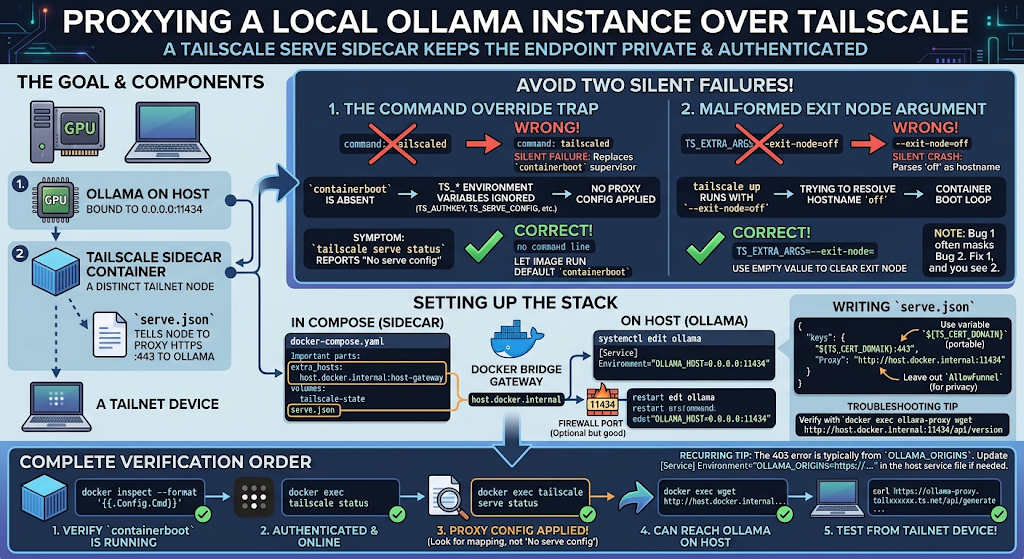
Ollama binds to 127.0.0.1:11434 and has no authentication at all. Not a token,
not a password — if you can reach the port, you can list the models, run
inference on them, and delete them. That design is fine for a loopback-only
service on your desk. It becomes a problem the moment you want to use that
machine’s GPU from a laptop in another room.
The obvious fixes are all worse than they sound. Port-forwarding on the router puts an unauthenticated API on the public internet. Binding to the LAN trusts every device on your network, including the ones running firmware from 2019. Putting a reverse proxy with basic auth in front means managing certificates and a password store for a service that doesn’t understand either.
Tailscale Serve sidesteps the whole question. It gives the service a real DNS name with a valid, auto-renewed TLS certificate, reachable only by devices already authenticated to your tailnet. No ports opened, no certificates to manage, no password to share. The authentication problem is solved one layer down, by the network.
Running it as a Compose sidecar — rather than tailscale serve on the host —
keeps the whole configuration in a file you can commit and move to another
machine. That’s the pattern this post describes.
There is a catch, and it’s why this post exists. The Compose snippet that
circulates for Tailscale sidecars contains two settings that silently prevent
Serve from ever working. Nothing errors. docker compose up succeeds, the
container reports healthy, the node appears in your admin console, and the
proxy does nothing. I lost an evening to the pair of them.
The shape of the thing
Three pieces:
- Ollama on the host, bound to an address the container can reach.
- A Tailscale container, which joins the tailnet as its own node with its own hostname and its own IP — separate from the host, even if the host is already on your tailnet.
- A
serve.json, which tells that node to terminate HTTPS on:443and proxy everything to Ollama.
The second point is the one worth sitting with. The sidecar is a distinct tailnet node, not a share of the host’s membership. That’s the feature: the host keeps whatever Tailscale identity it already had, and this service gets its own name, its own ACL target, and its own certificate, independent of it. You can revoke it without touching the host.
Two silent failures
Both of these come from the same Compose snippet, and both fail quietly.
1. Never set command: on the Tailscale image
This is the big one. The snippet everyone copies includes:
command: tailscaled # ← delete this line
It looks harmless. It is the single reason Serve won’t work.
Inspect the image and you find it has an empty entrypoint and declares
containerboot as its default Cmd:
$ docker image inspect tailscale/tailscale:latest \
    --format 'Entrypoint: {{.Config.Entrypoint}}  Cmd: {{.Config.Cmd}}'
Entrypoint: []  Cmd: [/usr/local/bin/containerboot]
containerboot is a supervisor. It reads the TS_* environment variables,
authenticates the node, applies the Serve configuration, and then execs
tailscaled itself. It is the component that gives those variables meaning.
Because it’s declared as Cmd and not Entrypoint, a command: in your
Compose file replaces it outright. You get a bare tailscaled with no
supervisor, and every TS_* variable in your file becomes decoration:
| Variable | What it does with command: tailscaled |
|---|---|
TS_AUTHKEY | Ignored. Node never authenticates on a fresh volume. |
TS_SERVE_CONFIG | Ignored. Your serve.json is never read. |
TS_STATE_DIR | Ignored (though /var/lib/tailscale is the default anyway). |
TS_EXTRA_ARGS | Ignored — tailscale up never runs. |
The tell is that everything looks right. If the state volume already holds an
authenticated node, tailscaled finds it, connects, and shows up healthy in
tailscale status. The node is genuinely online. It just isn’t proxying
anything, because nothing ever read the config file:
$ docker exec ollama-proxy tailscale serve status
No serve config
That line, with a TS_SERVE_CONFIG plainly set in your Compose file, is the
symptom. The fix is to delete command: and let the image run its own default.
2. --exit-node=off is not how you turn off an exit node
The same snippet carries:
- TS_EXTRA_ARGS=--exit-node=off # ← wrong
Once you’ve fixed the first problem, this one starts crash-looping your
container — which is a strange kind of progress, because it means
containerboot is finally running and finally passing TS_EXTRA_ARGS to
tailscale up.
tailscale up doesn’t take off as a value. It reads off as a hostname,
tries to resolve it against the tailnet, and dies:
boot: Running 'tailscale up'
cannot resolve exit node by hostname while Tailscale is starting up;
please use its Tailscale IP address instead
boot: Sending SIGTERM to tailscaled
boot: failed to auth tailscale: tailscale up failed: exit status 1
The correct way to clear an exit node is an empty value:
- TS_EXTRA_ARGS=--exit-node=
Note how these two bugs interact, because it explains why the broken snippet
propagates so well: as long as command: tailscaled is present, tailscale up
never runs, so the malformed argument never surfaces. Bug one masks bug two.
Fix the first and you are rewarded with a boot loop. It feels like a regression.
It isn’t — you’ve just removed the thing that was hiding the second error.
Reaching Ollama from the container
Ollama runs on the host here, as a systemd unit, because it needs the GPU and I would rather not pass a card into a container. So the sidecar has to get back out to the host, which takes two changes.
On the host, Ollama must listen somewhere other than loopback. Loopback inside the host’s namespace is not reachable from a bridged container:
sudo systemctl edit ollama
[Service]
Environment="OLLAMA_HOST=0.0.0.0:11434"
sudo systemctl daemon-reload && sudo systemctl restart ollama
This sounds like it undoes the security argument, and it would — except that
nothing publishes 11434 beyond the host’s own interfaces, and the only reason
we need it is so the sidecar can reach it. Firewall the port at the host if your
LAN is untrusted; the tailnet path doesn’t depend on it being reachable from
anywhere else.
In Compose, give the container a stable name for the host:
extra_hosts:
  - host.docker.internal:host-gateway
host-gateway is a value Docker resolves to the bridge gateway address. Use it
rather than hardcoding what you see in ip route — that subnet is assigned when
the Compose network is created, and it will change out from under you the first
time the network is recreated.
Verify this leg on its own before involving Tailscale at all:
$ docker exec ollama-proxy wget -qO- http://host.docker.internal:11434/api/version
{"version":"0.40.13"}
Writing serve.json
The Serve configuration is a JSON file, mounted read-only, that containerboot
applies at startup:
{
  "TCP": {
    "443": {
      "HTTPS": true
    }
  },
  "Web": {
    "${TS_CERT_DOMAIN}:443": {
      "Handlers": {
        "/": {
          "Proxy": "http://host.docker.internal:11434"
        }
      }
    }
  }
}
Three things to know about this file.
Use ${TS_CERT_DOMAIN}, not your literal hostname. containerboot
substitutes it with the node’s actual certificate domain at startup. Hardcoding
myhost.tailxxxxxx.ts.net works right up until you rename the node, change
tailnets, or copy the file to a second machine — at which point the key no
longer matches the request’s Host header and every request 404s. The variable
makes the file portable.
The absence of AllowFunnel is doing real work. Adding it would publish
this to the public internet. For an API with no authentication, that is close to
the worst possible outcome, so the omission is deliberate and worth a comment in
your own copy.
An empty {} is not a disabled config, it’s a broken one. If you create the
file as a placeholder and forget to fill it, tailscale serve status reports
No serve config — exactly the same message as the command: bug above. Two
very different causes, one indistinguishable symptom.
The complete stack
# docker-compose.yaml -- Tailscale Serve sidecar for a host-local Ollama.
#
# Ollama runs on the host as a systemd unit with OLLAMA_HOST=0.0.0.0:11434,
# so it keeps direct GPU access and the sidecar reaches it over the bridge.

services:
  tailscale:
    image: tailscale/tailscale:latest
    # No 'command:' here on purpose. This image has an empty entrypoint and
    # declares containerboot as its default Cmd -- and containerboot is what
    # reads TS_AUTHKEY / TS_SERVE_CONFIG / TS_STATE_DIR before exec'ing
    # tailscaled itself. Because it is Cmd and not Entrypoint, a 'command:'
    # here replaces it outright, so every TS_* var below is silently ignored
    # and the serve config is never applied.
    container_name: ollama-proxy
    hostname: ollama-proxy
    volumes:
      # Persists node identity. Without it the node re-registers under a new
      # name on every 'up', leaving stale hosts in the admin console.
      - tailscale-state:/var/lib/tailscale
      - ./serve.json:/etc/tailscale/serve.json:ro
    devices:
      - /dev/net/tun:/dev/net/tun
    cap_add:
      - NET_ADMIN
      - NET_RAW
      - SYS_MODULE
    # host-gateway resolves to the bridge gateway. Better than hardcoding it:
    # the subnet changes whenever the Compose network is recreated.
    extra_hosts:
      - host.docker.internal:host-gateway
    environment:
      # Reusable, tagged key from the admin console (Settings -> Keys), kept
      # in .env. Never inline it. Only needed on a fresh state volume.
      - TS_AUTHKEY=${TS_AUTHKEY}
      - TS_STATE_DIR=/var/lib/tailscale
      # Kernel networking rather than userspace netstack. Needs the tun
      # device and NET_ADMIN, both granted above.
      - TS_USERSPACE=false
      - TS_SERVE_CONFIG=/etc/tailscale/serve.json
      # Clear any exit node. The value must be EMPTY, not 'off' --
      # containerboot feeds TS_EXTRA_ARGS to 'tailscale up', which parses
      # 'off' as a hostname and dies on every boot.
      - TS_EXTRA_ARGS=--exit-node=
    healthcheck:
      test: ["CMD", "tailscale", "status"]
      interval: 10s
      timeout: 5s
      retries: 5
    restart: unless-stopped

volumes:
  tailscale-state:
    driver: local
With serve.json as above, and TS_AUTHKEY in .env, that’s the whole
deployment.
Verifying it, in order
The failures here are quiet, so check each layer separately rather than going straight to the end-to-end test. In order:
# 1. containerboot is running -- not a bare tailscaled
docker inspect ollama-proxy --format '{{.Config.Cmd}}'
#    want: [/usr/local/bin/containerboot]

# 2. The node authenticated and is online
docker exec ollama-proxy tailscale status | head -1

# 3. The serve config was actually applied  <-- the step people skip
docker exec ollama-proxy tailscale serve status

# 4. The container can reach Ollama on the host
docker exec ollama-proxy wget -qO- http://host.docker.internal:11434/api/version
Step 3 is the one that matters. You want to see the mapping, not No serve config:
https://ollama-proxy.tailxxxxxx.ts.net (tailnet only)
|-- / proxy http://host.docker.internal:11434
Then, from any other device on the tailnet:
$ curl https://ollama-proxy.tailxxxxxx.ts.net/api/version
{"version":"0.40.13"}

$ curl https://ollama-proxy.tailxxxxxx.ts.net/api/tags
# ... your model list ...

$ curl https://ollama-proxy.tailxxxxxx.ts.net/api/generate \
    -d '{"model":"gpt-oss:20b","prompt":"Reply with exactly: proxy works","stream":false}'
{"response":"proxy works", ...}
Note the URL: no port, valid TLS, and a name that works from any tailnet device without a hosts-file entry. Point any Ollama client at it as the base URL and it behaves like a local instance.
The 403 that isn’t a proxy problem
One more thing, because it looks like a misconfiguration and isn’t.
Ollama filters requests by Origin header. Command-line tools and server-side
SDKs don’t send one, so they sail through. A browser-based app on another domain
does send one, and gets a flat 403. Measured through the proxy:
| Request | Result |
|---|---|
No Origin header (curl, SDKs, server-side clients) | 200 |
Origin: the tailnet URL itself | 200 |
Origin: some other domain | 403 |
So the proxy is fine, and for most uses the default is what you want — it means a random page you visit can’t quietly drive your GPU. If you genuinely need a browser app on a different origin to call this, widen the allowlist on the Ollama side, not the proxy:
[Service]
Environment="OLLAMA_ORIGINS=https://myapp.tailxxxxxx.ts.net"
Prefer naming origins explicitly. OLLAMA_ORIGINS=* on an API with no
authentication means any page in any browser on your tailnet can use it.
Adapting this to another service
The pattern generalizes to anything you want on your tailnet and nowhere else. The checklist:
- Copy the
tailscaleservice. Changecontainer_nameandhostname— the hostname becomes the DNS name, so pick something you’ll want to type. - Do not add
command:. If you inherited a snippet that has it, delete it. - Write
TS_EXTRA_ARGS=--exit-node=with an empty value, or omit the variable entirely if you have nothing to pass. - Point
serve.jsonat your backend. A service in the same Compose project is reachable by service name (http://app:8000); a host service needs thehost.docker.internal/host-gatewaypair above. - Keep
${TS_CERT_DOMAIN}as theWebkey rather than a literal hostname. - Keep the state volume. Losing it means a renamed node, and a renamed node means a new certificate and a new URL.
- Use a reusable, tagged auth key from
.env. Tagging lets you write ACLs against the service rather than against your user identity. - Leave Funnel off unless the service has real authentication of its own.
- Verify step 3 above —
tailscale serve status— before you conclude anything about whether this works.
The result is a GPU box you can use from anywhere you’re logged into your tailnet, with no open ports, no certificate management, and no shared password — and a configuration that fits in two files you can commit.
The lesson I’ll actually carry forward, though, is narrower than Tailscale: when
a container image ships a supervisor as its default Cmd, overriding command:
doesn’t tweak its behavior, it removes the supervisor. Every variable that
supervisor was supposed to read keeps sitting in your Compose file, looking
exactly as though it’s doing something.