Scheduling Docker Backups with Ofelia
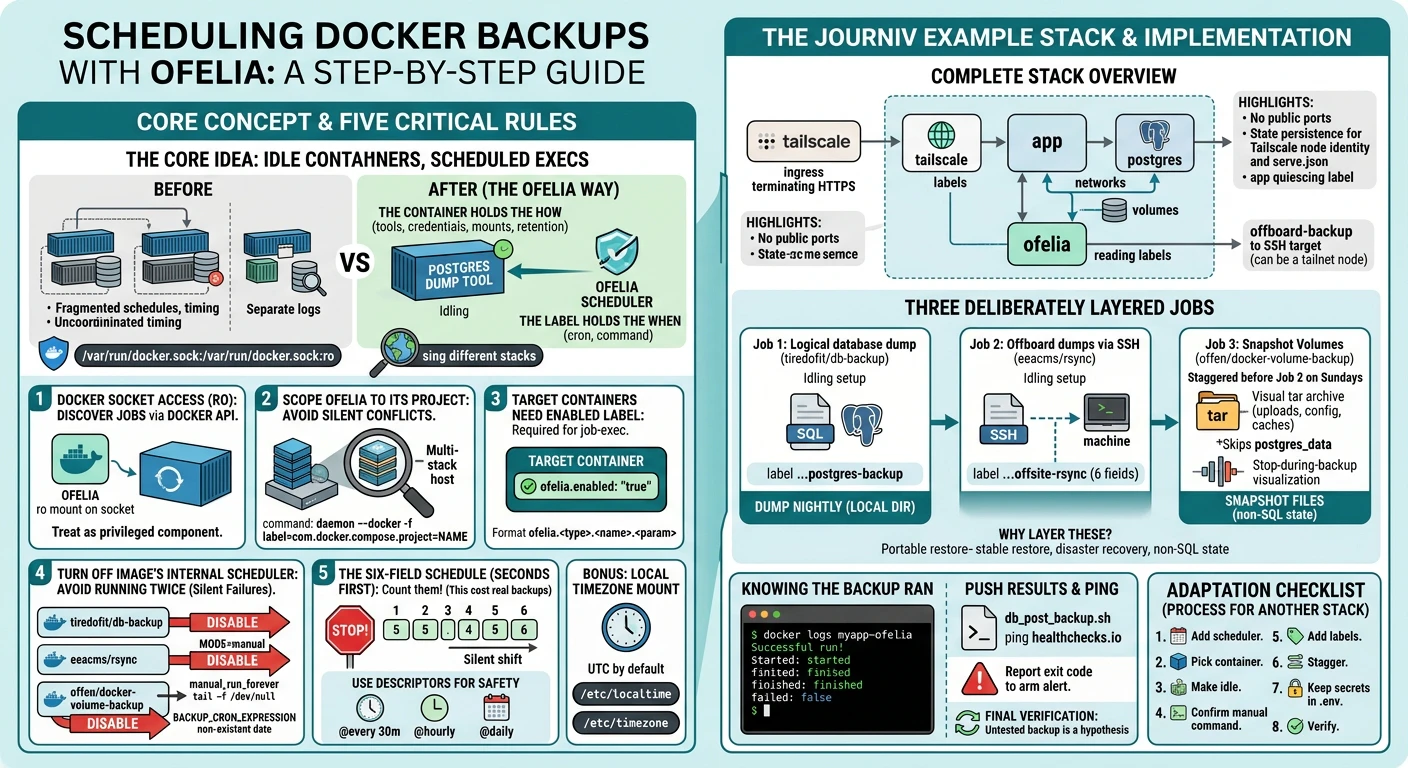
Every self-hosted stack eventually needs things to happen on a schedule: dump the database, push the dump somewhere off the machine, snapshot a volume. The usual answers are unsatisfying. A host crontab puts the schedule far away from the Compose file that defines the service. Letting each image run its own internal cron means the timing for one stack is spread across three or four different configuration dialects, and none of it shows up in one log.
Ofelia is a small Go scheduler that fixes
this by reading its jobs from Docker labels. You add a label to a service in
docker-compose.yaml, and Ofelia runs that command inside that container on
that schedule. The schedule lives next to the thing it schedules, and every run
is logged in one place.
This post is the pattern I settled on, using my Journiv deployment as the worked example. I wrote it to be reusable: the conventions are stated explicitly, and there is a checklist at the end for adapting it to a different project.
The core idea: idle containers, scheduled execs
The thing that makes this pattern click is slightly counterintuitive.
Ofelia’s most useful job type is job-exec, which runs a command inside an
already-running container. So instead of building a scheduler that knows how
to dump Postgres, you keep a container around that already knows how to dump
Postgres — with its tooling, credentials, and volume mounts in place — and you
tell it to do nothing. It just idles. Ofelia then execs the real command into it
on schedule.
That means the work of configuring a backup splits cleanly in two:
- The container holds the how: the image, the credentials, the mounts, the retention settings.
- The label holds the when: a cron expression and the command to run.
A pleasant side effect is that every job is trivially runnable by hand. If the
schedule is docker exec <container> <command>, then so is your manual test.
Ofelia has three other job types worth knowing about, though I rarely need them
here: job-run starts a new container from an image for each run,
job-local runs a command on the host running Ofelia, and job-service-run
creates a run-once Swarm service.
Five rules that make it work
These are the things that will bite you. I am stating them as rules because they are not obvious from the README, and four of the five are silent failures.
1. Ofelia needs the Docker socket, read-only
It discovers jobs by reading container labels through the Docker API:
volumes:
  - /var/run/docker.sock:/var/run/docker.sock:ro
Read-only is enough for job-exec. Note that socket access is effectively root
on the host, so treat Ofelia as a privileged component — pin its image tag and
don’t expose it to anything.
2. Scope Ofelia to its own Compose project
By default Ofelia reads labels from every container on the host. If you run more than one stack, two Ofelia instances will each happily pick up the other’s jobs and run everything twice.
The --docker -f label=... filter prevents that:
command: daemon --docker -f label=com.docker.compose.project=journiv
Docker Compose automatically applies com.docker.compose.project to every
container it creates, so this is a reliable way to say “only my stack.” The
project name defaults to the directory name; set it explicitly with
COMPOSE_PROJECT_NAME in .env if you don’t want to depend on that.
3. Target containers need ofelia.enabled=true
For label-based job-exec, the enabling label is required on the target
container — not on Ofelia:
labels:
  ofelia.enabled: "true"
  ofelia.job-exec.postgres-backup.schedule: "@daily"
  ofelia.job-exec.postgres-backup.command: /path/to/command
The label format is ofelia.<job-type>.<job-name>.<parameter>. The job name is
yours to choose; it’s what shows up in the logs, so make it descriptive.
4. Turn off the image’s own scheduler
If you leave the image’s built-in cron running, your job fires twice — once on the image’s schedule and once on Ofelia’s. Every image disables this differently, which is exactly the fragmentation Ofelia is meant to solve:
| Image | How to make it idle |
|---|---|
tiredofit/db-backup | MODE=manual + MANUAL_RUN_FOREVER=TRUE |
eeacms/rsync | command: tail -f /dev/null instead of client |
offen/docker-volume-backup | BACKUP_CRON_EXPRESSION: "0 0 5 31 2 ?" (a date that never occurs) |
| anything with a run-once entrypoint | entrypoint: ["tail", "-f", "/dev/null"] |
5. The schedule has six fields, and seconds come first
This is the one that cost me real backups, so it gets the long explanation.
On mcuadros/ofelia:latest (version 0.3.x), the seconds field is required.
The format is:
┌───────────── second (0-59)
│ ┌─────────── minute (0-59)
│ │ ┌───────── hour (0-23)
│ │ │ ┌─────── day of month (1-31)
│ │ │ │ ┌───── month (1-12)
│ │ │ │ │ ┌─── day of week (0-6)
│ │ │ │ │ │
0 30 3 * * *     ← 3:30:00 AM daily
A five-field expression is not rejected. It is silently shifted. I had written what I thought was “3:30 AM daily”:
ofelia.job-exec.offsite-rsync.schedule: "30 3 * * *"
Ofelia read that as second=30, minute=3, hour=* — every hour, at three minutes
and thirty seconds past. The logs made it obvious once I thought to look:
2026-10-11T00:03:30.023Z  [Job "offsite-rsync"] Started
2026-10-11T01:03:30.076Z  [Job "offsite-rsync"] Started
2026-10-11T02:03:30.100Z  [Job "offsite-rsync"] Started
Twenty-four rsyncs a day instead of one. Harmless for an incremental sync; considerably less harmless for a job that costs money or holds a lock. Count the fields. Ofelia 0.4.x makes seconds optional for backward compatibility, but writing all six fields is correct on both.
Descriptors sidestep the problem entirely and are my default when the exact minute doesn’t matter:
| Schedule | Meaning |
|---|---|
@every 30m | every 30 minutes from startup |
@hourly | top of every hour |
@daily | midnight |
@weekly | Sunday at midnight |
0 30 3 * * * | 3:30:00 AM daily |
0 0 2 * * 0 | 2:00:00 AM on Sundays |
Bonus: Ofelia’s clock is UTC unless you tell it otherwise
Cron expressions are evaluated in the container’s local time, and a bare Ofelia
container has no timezone — so it runs on UTC. My @daily Postgres backup was
firing at 20:00 EDT, not midnight. Mount the host’s timezone (or set TZ) so
schedules mean what they appear to mean:
volumes:
  - /etc/localtime:/etc/localtime:ro
  - /etc/timezone:/etc/timezone:ro
The complete stack
Below is a sanitized version of the Compose file this all comes from. Secrets and host-specific values are replaced with environment variables and placeholders; everything structural is real and running.
It defines four scheduled jobs, in a deliberate order: dump the database, copy the dumps off the machine, and snapshot the Docker volumes that hold everything the database doesn’t.
# docker-compose.yaml — app stack with Ofelia-scheduled backups.
#
# Secrets live in .env (not committed):
#   POSTGRES_PASSWORD   - database password
#   TS_AUTHKEY          - Tailscale reusable auth key
#   HC_PING_KEY         - healthchecks.io ping UUID (used by the hook scripts)
#
# Offboard SSH target lives in .backup.env (not committed):
#   SSH_USER, SSH_HOST_NAME, SSH_REMOTE_PATH

services:

  # ---------------------------------------------------------------
  # The scheduler. Reads jobs from labels on the containers below.
  # ---------------------------------------------------------------
  ofelia:
    image: mcuadros/ofelia:0.3.19
    container_name: myapp-ofelia
    restart: unless-stopped
    depends_on:
      - db-backup
      - offboard-backup
      - volume-backup
    # Only pick up job labels from containers in THIS compose project,
    # so it doesn't grab labels from unrelated stacks on the same host.
    command: daemon --docker -f label=com.docker.compose.project=myapp
    volumes:
      - /var/run/docker.sock:/var/run/docker.sock:ro
      # Without these, all schedules are evaluated in UTC.
      - /etc/localtime:/etc/localtime:ro
      - /etc/timezone:/etc/timezone:ro

  # ---------------------------------------------------------------
  # Ingress. Tailscale Serve terminates HTTPS on the tailnet and
  # proxies to the app; no ports are published to the public net.
  # ---------------------------------------------------------------
  tailscale:
    image: tailscale/tailscale:latest
    command: tailscaled
    container_name: myapp-tailscale
    hostname: myapp-tailscale
    volumes:
      # Persists node identity across restarts; without it, the node
      # re-registers on every `up` and leaves stale hosts behind.
      - tailscale-state:/var/lib/tailscale
      - /dev/net/tun:/dev/net/tun
      - ./serve.json:/etc/tailscale/serve.json:ro
    devices:
      - /dev/net/tun:/dev/net/tun
    cap_add:
      - NET_ADMIN
      - NET_RAW
      - SYS_MODULE
    environment:
      # Generate a reusable, tagged auth key in the Tailscale admin
      # console (Settings -> Keys) and put it in .env. Never inline it.
      - TS_AUTHKEY=${TS_AUTHKEY}
      - TS_STATE_DIR=/var/lib/tailscale
      - TS_SERVE_CONFIG=/etc/tailscale/serve.json
      - TS_EXTRA_ARGS=--exit-node=off --advertise-tags=tag:myapp-proxy
    healthcheck:
      test: ["CMD", "tailscale", "status"]
      interval: 10s
      timeout: 5s
      retries: 5
    restart: unless-stopped
    networks:
      - frontend

  # ---------------------------------------------------------------
  # Application and database.
  # ---------------------------------------------------------------
  app:
    image: example/myapp:${APP_VERSION:-latest}
    container_name: myapp-app
    env_file: .env
    environment:
      POSTGRES_HOST: postgres
      POSTGRES_PASSWORD: ${POSTGRES_PASSWORD}
      ENVIRONMENT: production
    volumes:
      - app_data:/data
    depends_on:
      postgres:
        condition: service_healthy
    networks:
      - backend
      - frontend
    restart: unless-stopped
    labels:
      # Quiesce the app while its volume is snapshotted (see volume-backup).
      - docker-volume-backup.stop-during-backup=myapp-app

  postgres:
    image: postgres:18.1
    container_name: myapp-postgres
    # Deliberately not published to the host; reachable only on `backend`.
    environment:
      - POSTGRES_USER=${POSTGRES_USER:-myapp}
      - POSTGRES_PASSWORD=${POSTGRES_PASSWORD}
      - POSTGRES_DB=${POSTGRES_DB:-myapp_prod}
    volumes:
      - postgres_data:/var/lib/postgresql
    networks:
      - backend
    restart: unless-stopped
    healthcheck:
      test:
        [
          "CMD-SHELL",
          "pg_isready -U ${POSTGRES_USER:-myapp} -d ${POSTGRES_DB:-myapp_prod}",
        ]
      interval: 10s
      timeout: 5s
      retries: 5
      start_period: 10s

  # ---------------------------------------------------------------
  # JOB 1 — logical database dump, nightly to a local directory.
  # ---------------------------------------------------------------
  db-backup:
    image: tiredofit/db-backup:4.1.21
    container_name: myapp-db-backup
    depends_on:
      postgres:
        condition: service_healthy
    volumes:
      - ./db_backups:/backup
      - ./db_backup_logs:/logs
      - /etc/localtime:/etc/localtime:ro
      - /etc/timezone:/etc/timezone:ro
      # Optional monitoring hooks; see "Knowing the backup ran".
      - ./db_pre_backup.sh:/assets/scripts/pre/db_pre_backup.sh
      - ./db_post_backup.sh:/assets/scripts/post/db_post_backup.sh
    networks:
      - backend
    environment:
      - TIMEZONE=America/New_York
      - CONTAINER_NAME=myapp-db-backup
      - CONTAINER_ENABLE_MONITORING=FALSE
      - BACKUP_JOB_CONCURRENCY=1
      - DEFAULT_CHECKSUM=MD5
      - DEFAULT_COMPRESSION=GZ
      - DEFAULT_CLEANUP_TIME=8640      # prune dumps older than ~6 days
      - DB01_TYPE=pgsql
      - DB01_HOST=postgres
      - DB01_NAME=${POSTGRES_DB:-myapp_prod}
      - DB01_USER=${POSTGRES_USER:-myapp}
      - DB01_PASS=${POSTGRES_PASSWORD}
      - USER_DBBACKUP=1000             # own the dumps as the host user
      - GROUP_DBBACKUP=1000
      # RULE 4: MODE=manual + MANUAL_RUN_FOREVER disables this image's
      # own cron and keeps the container idling for Ofelia to exec into.
      - MODE=manual
      - MANUAL_RUN_FOREVER=TRUE
    labels:
      ofelia.enabled: "true"
      ofelia.job-exec.postgres-backup.schedule: "0 0 1 * * *"
      ofelia.job-exec.postgres-backup.command: /etc/services.available/dbbackup-01/run now

  # ---------------------------------------------------------------
  # JOB 2 — offboard the dumps to another machine over SSH.
  # A backup on the same disk as the database is not a backup.
  # ---------------------------------------------------------------
  offboard-backup:
    image: eeacms/rsync:2.9
    container_name: myapp-offboard-backup
    restart: unless-stopped
    env_file: ./.backup.env        # SSH_USER, SSH_HOST_NAME, SSH_REMOTE_PATH
    extra_hosts:
      # Only needed if the target isn't resolvable by DNS from the container.
      - "backup-host:192.168.1.50"
    volumes:
      - ${HOME}/.ssh/id_rsa:/root/.ssh/id_rsa:ro
      - ${HOME}/.ssh/id_rsa.pub:/root/.ssh/id_rsa.pub:ro
      - ./db_backups:/db_backups:ro   # read-only: this job only ever sends
      - /etc/localtime:/etc/localtime:ro
      - /etc/timezone:/etc/timezone:ro
    # RULE 4: was `command: client`, which ran the image's own crond
    # reading CRON_TASK_1. Now it just idles so Ofelia can exec into it.
    command: tail -f /dev/null
    labels:
      ofelia.enabled: "true"
      # RULE 5: six fields, seconds first. This is 3:30:00 AM daily.
      ofelia.job-exec.offsite-rsync.schedule: "0 30 3 * * *"
      # `$$` is Compose's escape for a literal `$`, so the variables are
      # expanded by the shell inside the container, not by Compose.
      ofelia.job-exec.offsite-rsync.command: >-
        sh -c "rsync -av --progress -e 'ssh -o StrictHostKeyChecking=no'
        /db_backups/ $$SSH_USER@$$SSH_HOST_NAME:$$SSH_REMOTE_PATH"

  # ---------------------------------------------------------------
  # JOB 3 — snapshot a Docker named volume as a tar archive.
  # Catches everything a SQL dump misses: uploads, config, state.
  # ---------------------------------------------------------------
  volume-backup:
    image: offen/docker-volume-backup:v2.44.0
    container_name: myapp-volume-backup
    restart: always
    env_file: ./.backup.env        # reused for the SSH_* target
    environment:
      BACKUP_SOURCES: /backup/app_data
      BACKUP_FILENAME: "myapp-app-data-%Y-%m-%dT%H-%M-%S.{{ .Extension }}"
      BACKUP_RETENTION_DAYS: "30"
      # Required alongside retention, or pruning considers every file
      # in the target directory — including other stacks' backups.
      BACKUP_PRUNING_PREFIX: "myapp-app-data-"
      # Stops containers carrying this label for the duration of the
      # snapshot, so nothing is writing mid-tar.
      BACKUP_STOP_DURING_BACKUP_LABEL: myapp-app
      # RULE 4: Feb 31st never arrives, so the internal cron never fires
      # and Ofelia is the only scheduler.
      BACKUP_CRON_EXPRESSION: "0 0 5 31 2 ?"
    volumes:
      # Mount the volume read-only at a path under BACKUP_SOURCES.
      - app_data:/backup/app_data:ro
      # Needed to stop/start the labelled containers.
      - /var/run/docker.sock:/var/run/docker.sock:ro
      - ${HOME}/.ssh/id_rsa:/root/.ssh/id_rsa:ro
      - /etc/localtime:/etc/localtime:ro
      - /etc/timezone:/etc/timezone:ro
    labels:
      ofelia.enabled: "true"
      # 2:00:00 AM Sundays — before the 3:30 offboard run, so the
      # fresh archive is included in that night's sync.
      ofelia.job-exec.volume-snapshot.schedule: "0 0 2 * * 0"
      # The image ships /usr/bin/backup as a run-once entrypoint.
      ofelia.job-exec.volume-snapshot.command: backup

volumes:
  app_data:
  postgres_data:
  tailscale-state:
    driver: local

networks:
  backend:
    driver: bridge
  frontend:
    driver: bridge
Why these three jobs and not one
The jobs are layered, and the layering is the point:
db-backupproduces a logical dump — portable SQL you can restore into a different Postgres version on different hardware. This is what you want for almost every real recovery.offboard-backupmoves those dumps to another machine. A dump sitting on the same disk as the database it came from protects you against exactly one failure mode: your ownDROP TABLE.volume-backupcaptures the state that never appears in a SQL dump — uploaded files, generated config, caches with warm-up cost. Running it withstop-during-backupbuys consistency at the cost of a short outage, which is a trade I’ll take at 2 AM on a Sunday.
Note that volume-backup does not snapshot postgres_data. Tarring a live
database directory produces an archive that may or may not restore, and you
already have a better artifact from db-backup. Snapshot volumes whose
contents are files; dump things whose contents are transactions.
A note on the Tailscale service
Tailscale isn’t a backup job, but it’s load-bearing here, and it interacts with the backups in one way worth stating: because ingress terminates inside the tailnet, nothing in this stack publishes a port to the public internet, and the offboard SSH target can itself be a tailnet node rather than a host with an open SSH port.
serve.json holds the proxy mapping:
{
  "TCP": { "443": { "HTTPS": true } },
  "Web": {
    "myapp-tailscale.tailxxxxxx.ts.net:443": {
      "Handlers": { "/": { "Proxy": "http://app:8000" } }
    }
  }
}
Replace tailxxxxxx.ts.net with your own tailnet name. Two things that are easy
to get wrong: the tailscale-state volume must persist, or the node
re-registers under a new name on every restart and your serve.json hostname
stops matching; and the auth key should be reusable and tagged, so that
docker compose up on a fresh host doesn’t require a manual login.
Knowing the backup ran
A scheduler you don’t monitor is a scheduler that stops working quietly. Ofelia logs every run to its own stdout, which is the fastest place to check:
docker logs -f myapp-ofelia
Successful runs look like this, with the exit status and duration of the command Ofelia executed:
[Job "postgres-backup" (b9cfae852307)] Started - /etc/services.available/dbbackup-01/run now
[Job "postgres-backup" (b9cfae852307)] StdOut: ... DB Backup of 'pgsql_myapp_prod_20261010-200000.sql.gz' completed successfully
[Job "postgres-backup" (b9cfae852307)] Finished in "1.009192493s", failed: false, skipped: false, error: none
Reading these logs is also how you catch rule 5. Watch the timestamps on a few consecutive runs of a job and confirm the interval is what you intended.
For anything you actually care about, push the result somewhere that will
complain when it doesn’t arrive. tiredofit/db-backup supports pre- and
post-backup hook scripts, which I use to ping a
healthchecks.io monitor — it alerts on silence,
which is the failure mode that matters:
#!/bin/bash
# db_post_backup.sh
# $1=EXIT_CODE $2=DB_TYPE $3=HOST $4=DB_NAME $5=START $6=FINISH
# $7=DURATION $8=FILENAME $9=FILESIZE $10=HASH

EXIT_CODE=$1
TMPFILE=$(mktemp /tmp/db_post_backup_output.XXXXXX)
trap 'rm -f "$TMPFILE"' EXIT

# HC_PING_KEY comes from the environment — don't hardcode it.
HC_URL="https://hc.example.com/ping/${HC_PING_KEY}"

echo "${2} backup of ${4} on ${3} finished in ${7}s. File: ${8} Size: ${9}" > "$TMPFILE"
curl -fsS -m 10 --retry 5 -X POST --data-binary @"$TMPFILE" -o /dev/null "${HC_URL}/log"

# Reporting the exit code is what arms the alert.
curl -fsS -m 10 --retry 5 -o /dev/null "${HC_URL}/${EXIT_CODE}"
And then the part everyone skips: restore one of these dumps into a scratch database and look at it. An untested backup is a hypothesis.
Adapting this to another project
If you’re porting this pattern to a different stack — or pointing an agent at this post and asking it to — here is the checklist.
Add the scheduler. Copy the ofelia service. Change the project name in
-f label=com.docker.compose.project=<name> to match the target stack’s
Compose project, and list the backup services in depends_on. Keep the
localtime/timezone mounts.
For each thing that needs to run on a schedule:
- Pick the container that already has what the job needs — the right
binary, the right credentials, the right mounts. Prefer
job-execinto an existing service overjob-runwith a new image. - Make that container idle. Find the image’s own scheduler and disable it
(see the table in rule 4). If you can’t, override
entrypointorcommandwithtail -f /dev/null. Verify withdocker logsthat it isn’t still running jobs on its own. - Find the one-shot command the image exposes, and confirm it by hand
before scheduling it:
docker exec <container> <command>. If it doesn’t work interactively, it won’t work on a schedule. - Add the labels —
ofelia.enabled: "true", plusofelia.job-exec.<name>.scheduleandofelia.job-exec.<name>.command. - Write six cron fields, seconds first, or use a
@descriptor. Count them. This is the single most common way to get this wrong. - Escape
$as$$in any command that should expand variables inside the container rather than at Compose parse time. - Stagger the schedules so dependent jobs run in order — dump before offboard, snapshot before offboard — and nothing overlaps.
Keep secrets out of the Compose file. Passwords, auth keys, and ping URLs
belong in .env or .backup.env, referenced as ${VAR}. If you are sanitizing
an existing Compose file for publication, grep it for tskey-, password,
token, _KEY, private IP ranges, and absolute paths under /home before you
publish.
Then verify, in this order:
docker compose up -d
docker logs myapp-ofelia              # jobs registered, no label errors?
docker exec myapp-db-backup /etc/services.available/dbbackup-01/run now
docker logs myapp-ofelia -f           # correct interval across runs?
The result is a stack where the answer to “what runs on this machine, and when?” is contained entirely in one file, next to the services it applies to. For infrastructure you touch twice a year, that locality is worth more than the handful of CPU cycles the scheduler costs.